ComboCurve: ARIES Export - (Blocked) When Daily Production Data Exceeds 1mm Lines
If you receive an error such as this when export to ARIES .accdb:
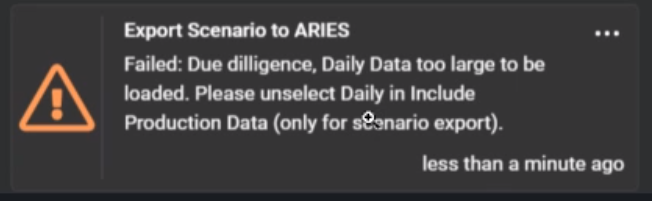
This article describes a workflow in Excel using VBA to allow export of CC daily prod data to .csv so that it can be imported natively into ARIES.
Note: Update 10/6/2025 - An update has been made to the ComboCurve daily production export which now allows date format in mm/dd/yyyy so that the VBA workflow below is no longer needed. Now, users can ensure
1) Export with the ID that the ARIES database was exported with (ChosenID or INPTID for example)
2) Minimize extraneous data columns like Well Name, Well Number or API not used for the id in #1 above
3) Change the headers in the CSV with notepad (or similar) or Access import to PROPNUM, D_DATE, OIL, GAS, WATER
4) Import to ARIES in Access via External Data==>New Data Source==>From File==>Text File==>Append a copy of the records to the table: AC_DAILY (and specify the file)
Note that we are currently working on a secondary export for the .csv file along with the .accdb to further speed up the process.
Below is a video on the above steps:
https://www.loom.com/share/9540f7d8faeb4a6bbed050f5e4247499?sid=fd5f62ad-bb06-42ef-9777-c7c1ac1b850c
Related Articles
ComboCurve: Export Scenario to ARIES
Export Scenario to ARIES When exporting there are two types of exports Exports entire contents of economics into an MS Access database for use in ARIES, or A CSV file that can be copied into the AC_ECONOMIC table and a TXT file that can be imported ...ComboCurve: ARIES Import/Export Conversions – Currently Unsupported Items
The current version of the front-end ARIES import interface handles the majority of ARIES database imports and exports. Some of the more complex and less commonly used syntax, especially certain overlay definitions, might not be currently handled, ...ComboCurve: Import ARIES Database
Import ARIES Database For a video tutorial on import/exporting and QC tieouts of econ see the following article - ComboCurve: ARIES Conversions Also to see items unsupported see the following article - ComboCurve: ARIES Import/Export Conversions – ...ComboCurve: ARIES - Importing and Exporting Forecasts via .txt in the Forecast Module
Importing and Exporting Forecasts to ComboCurve from ARIES Importing Forecast to ComboCurve From ARIES Here's a video showing the workflow: https://www.loom.com/share/ff233c5af4c34e7fa33db9711dd5a8e5 ComboCurve has a method to ingest forecasts (only, ...ComboCurve: ARIES - Preparing and Transferring Access databases (.accdb or .mdb)
Preparing and Transferring ARIES Access databases (.accdb or .mdb) General Size Limits ComboCurve has full support for ARIES (MS Access databases) and PHDWin imports. Feel free to submit a ticket and a Customer Success Representative can help in the ...