ComboCurve: v45 Update (04/14/2026)
V45.0 Updates
Forecast/Type Curve
- Modular Forecasting Available from Comparison View - users can now access Modular Forecast and edit forecast while in Comparison Forecast view
Modular Forecasting Well Indexing - While in Modular Forecasting users can see the count on the bottom left as another way to indicate which well the user is on
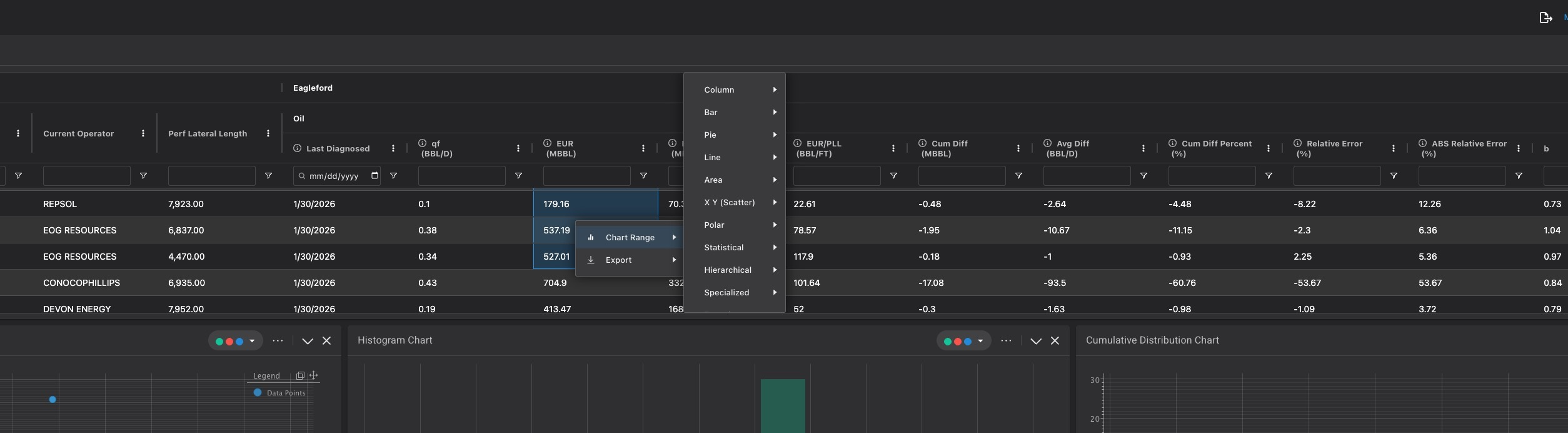
AG Charts available on Scalar and Time Series Table - the user now has the ability to create ad hoc charts on the scalar table in Diagnostics. You can select a range of data and right click to create custom charts
Scenario/Economics
V45.1 Updates
Forecast/Type Curve
Scenario
General App
Production row creation from wells page
- Users can now insert rows of production into the wells table directly rather than having to CSV import
Advanced Share Code Version 2
- Users can now cross map custom streams and headers between company and project when doing advanced sharecodes
Map toolbar upgrade for shapes and added polygon tool tip
- QOL upgrade to the tool selection toolbar in the map
V45.2 Updates
Forecast/Type Curve
- Additional P Series in Probit Plot
- Target Normalization on TC Workflow Export
Scenario/Economics
V45.3 Updates
Forecast/Type Curve
Scenario/Economics
Production Taxes ELTs
- Embedded lookup table functionality has now been added to the production taxes assumption. This includes Aries support as well
Production Taxes Data Snaps
- Data Snaps functionality has now been added to the Production Taxes assumption.
Expenses Start Date Criteria w/ Aries Support
- A new criteria option as been added to the Expenses assumption. This allows user to trigger an expense off a hard coded date or data snaps and model expense changes in monthly durations from that date. This includes Aries support as well
Show Model Names for O&R
- A new option has been added to the three dot drop down for Ownership and Reversion. "Show Model Names" allows users to easily switch between viewing model names or WI/NRI for O&R.
Scenario Table Performance Improvements
- Made significant performance improvements to the responsiveness of the scenario table for large scenarios (QB)
Caching Pricing Comparison View
- We now cache whether the user was on advanced or comparison view for the pricing assumption. With this enhancement, pricing standard view will be disabled.
General App
- AG Grid Charts - Wells Table
- Users can now create custom charts based off of the data available in the wells table. To access, click new icon next to header selection in the wells table.
V45.4 Updates
Forecast/Type Curve
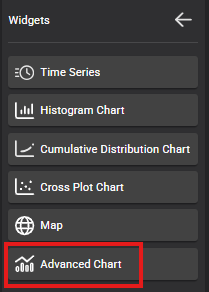
- Advanced Chart Widget in Diagnostics
Scenario/Economics
- Differentials ELTs Aries import support
- Stream Properties ELTs Aries import support
Scenario/Economics
- 10 Additional Reversions (20 Total)
- Total Fluid Curtailment

Related Articles
ComboCurve: v39 Update (03/01/2025)
ComboCurve: v39 Update v39.7 Updates Data integrity improvements Bug fixes v39.6 Updates Map View on Wells Table Users are no longer limited to accessing the map only in the filter page. Users can now view the map on any wells table within a project. ...
ComboCurve: v38 Update (01/01/2025)
ComboCurve: v38 Update v38.0 Updates Group Forecasting and Economics with Well Collections Instantaneous Grouping, Sorting, and Filtering on the New Scenario Table Version Ability to change data source at any point in the import workflow Source ...
ComboCurve: v36 Update (12/01/2023)
ComboCurve: v36 Update For our v36 update, featured a suite of advanced tools and functionalities designed to revolutionize your forecasting, economic analysis, and data management capabilities. Our focus was on enhancing user experience with ...
ComboCurve: v35 Update (11/03/2023)
ComboCurve: v35 Update For our v35 update, ComboCurve unveiled significant enhancements across our product offerings, aiming at enriching user experience with improved workflow efficiency, advanced economics, forecasting, and superior reporting ...
ComboCurve: v37 Update (10/01/2024)
ComboCurve: v37 Update v37.10 Updates "Apply Econ Run" will now apply all Apply Econ Run headers instead of just the ones selected in the econ run "Combo Name" is now a selectable header for Aggregate PDF reports Added "After Income Tax IRR" to ...